
When Speed Saves Lives
Team Rubicon moves critical resources—PPE, emergency supplies, equipment—across departments, regions, and time-sensitive deployments.
Shopify provided a familiar interface, but its standard checkout model is optimized for commerce, not internal logistics.
Urgency
Transfers happen under disaster response timelines
Governance
Inventory movement needs approval trails
Visibility
Leadership needs usage patterns and accountability
Friction at the Worst Moment
The existing transfer process created friction exactly when speed and correctness matter most.
Manual Refund Loop
Transfers required "purchasing" items then manual refunds—slow, error-prone, hard to audit
No Approval Workflow
Inconsistent authorization and weak accountability across regions
Limited Reporting
Leadership couldn't answer: What moved, where, when, and under whose approval?
UX Bottlenecks
Staff navigated flows designed for customers, not internal operators
Logistics-Native Workflow
Replace a commerce workaround with a logistics-native workflow—while keeping Shopify's familiarity.
Decouple Transfer from Transaction
No money, no refunds—transfers as operational events
First-Class Approvals
Multi-stage, value/type-based routing with audit trails
Design for Roles & Regions
Least-privilege access, clear ownership boundaries
Bake in Visibility
Metrics + filters leadership can actually use
What I Built
Custom Checkout for Non-Monetary Transfers
- Built custom checkout flow recording transfers as controlled operational events
- Eliminated refund loop entirely, reducing manual steps and reconciliation errors
Multi-Stage Approval Workflow
- Automated approval routing based on inventory type and value
- Notifications to keep admins and regional leaders aligned
- Clear audit trail: who requested, who approved, when it moved
Real-Time Inventory Movement Tracking
- Captured movement history and status from request to completion
- Enforced protocol compliance through accurate logging and state transitions
Role-Based React Admin Dashboard
- User management: create users, assign roles, granular access controls
- Transfers dashboard: metrics scoped to user's access level
- Drill-down analytics: filter by time, department, region
Express.js Back-End Services
- API handling approvals, status transitions, reporting endpoints
- Shopify integrations designed for scalability and security
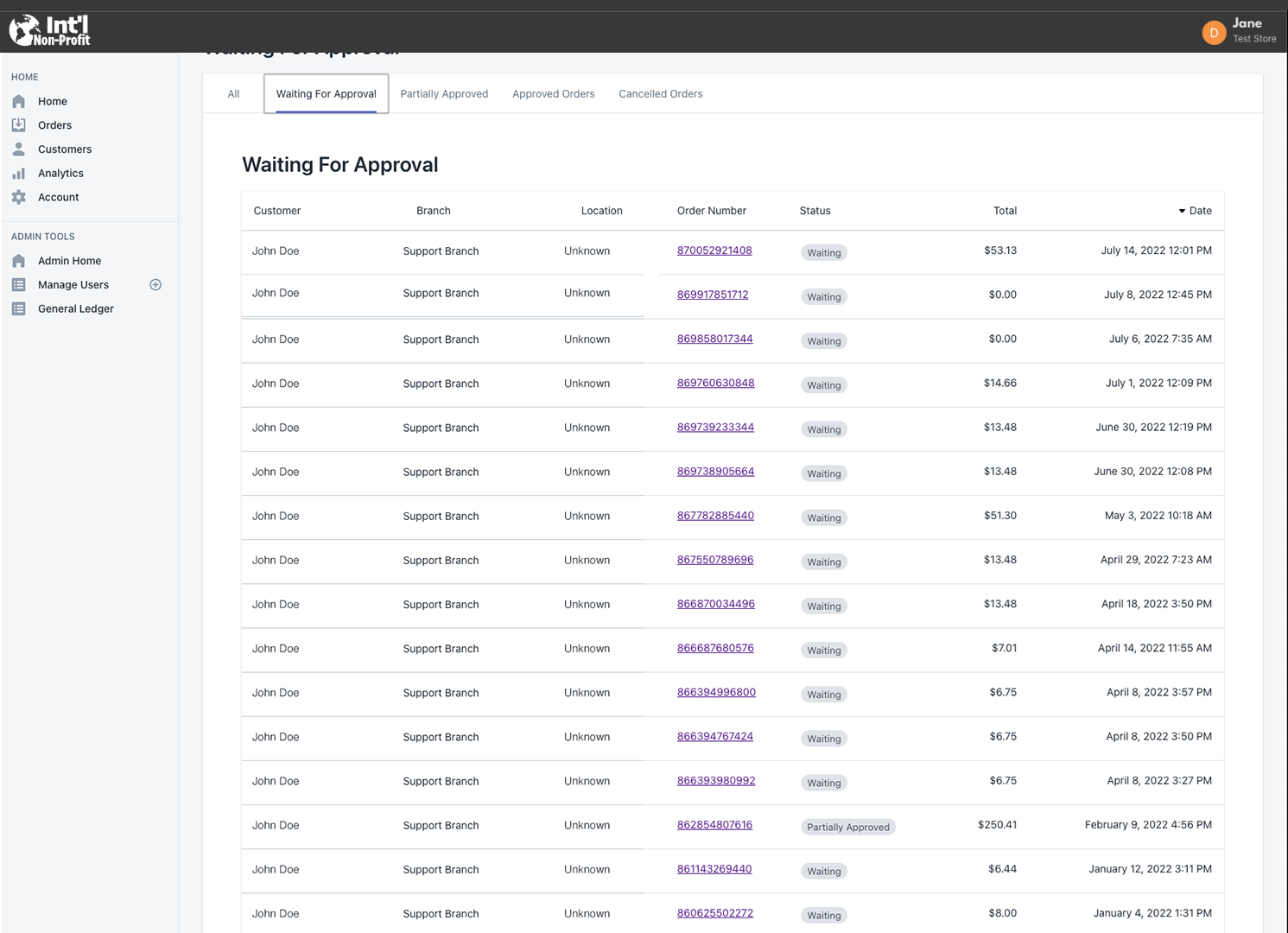
Role-based admin dashboard with customer management, orders, analytics, and administrative tools
Before → After
- Shopify "purchases" + manual refunds
- Inconsistent approvals
- Weak reporting
- Slow reconciliation
- Fast, auditable transfer workflow
- Multi-stage, role-based approvals
- Real-time analytics & visibility
- Purpose-built for disaster response
Reduced Manual Effort
Eliminated refund-based reconciliation
Stronger Accountability
Structured multi-stage approvals
Improved Accuracy
Real-time movement tracking
Leadership Visibility
Analytics and segmentation
Faster Onboarding
Intuitive React dashboard
Scalable Foundation
Ready for future enhancements
What Made This Work
"Model reality, not the platform default."
Shopify assumes money changes hands; Team Rubicon's workflow assumes resources change hands. The UI and data model had to reflect operational truth.
State-Machine Workflow
Request → Review → Approve → Fulfill → Complete (with logs at each step)
Least-Privilege Access
Roles mapped to real org authority: superadmin, cross-regional admin, region admin
Auditability as a Feature
Approvals + movement history are core product requirements, not extras
Reusable Patterns
Platform Leverage + Workflow Ownership
Use the platform where it's strong (catalog, familiar UI, baseline structure). Own the workflow where the business is unique (approvals, transfers, audit trails).
Remove Human Reconciliation
If a workflow relies on humans cleaning up system artifacts (refunds, spreadsheets, manual logging), it will fail under pressure. Automate the truth.
Operational UIs Must Default to Speed
Operators don't want more features—they want fewer clicks and fewer mistakes.
Building Internal Tooling on E-Commerce?
Copy these patterns
Identify the biggest "workaround loop" (refunds, duplicate entry, manual approvals)
Replace it with a domain-native primitive (transfer ≠ purchase)
Add approval routing that mirrors authority (value/type-based rules)
Ship a dashboard that answers: What moved? Where? When? Who approved?
Treat roles and audit logs as core product—not admin afterthoughts